

Share this article


Steps to Convert iOS App to Android App
Companies have to develop iOS and Android apps to provide services easily to their customers and market their brand smoothly. But a lot of companies choose to convert iOS apps to Android apps or build applications for both platforms to reach and get into a larger user base of Android. It is true that iOS users always have higher purchasing power than Android users, but the latter has a much bigger number.
Developed countries like the US, Australia, and Europe have a dominating market for iOS apps, while the developing economies like Asia and Africa rely on Android. However, the fact is that developing countries are the biggest market for any Android app development company because of their high number of users. Android comes under the affordable category; a very large number of people own this operating system. Also, on the basis of the customisation of the app according to the needs of users android is more flexible. Hence, the requirements to convert iOS app to Android came to the surface.
Market Stats Regarding iOS App vs Mobile App
- Android app holds 70.36% of the app market globally as of 2026, which is way higher than iOS with 29.25% according to StatCounter.
- The Android users have grown to 3.74 billion compared to iOS users with 1.38 billion users worldwide, with revenue of $72 billion in 2026.
- The worldwide revenue from mobile apps is expected to grow to US$752.57 billion by 2027.
Also Read: Mobile App Development Process
Key Differences Between iOS and Android Platforms
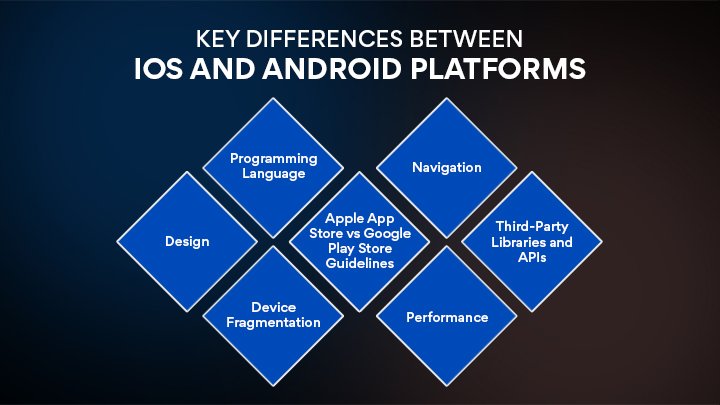
When you move an iOS app to Android, you have to evaluate and analyse the differences between the two highly popular platforms. These differences can be the biggest ally if understood better, or they may hinder the process.
1. Design
Android works on Google’s Material Design principles with a major focus on bright colours, animations, and responsive layouts. It uses floating action buttons that can be abbreviated as FABS, multiple screen densities, and intense customizability. iOS needs Apple Human Interface Guidelines (HIG). It focuses on simplicity, clarity, and investigative depth.
iOS platforms use tab bars, minimal shadows, and a similar look across the app. It means that you can not use the iOS platform’s design on an Android device. You have to convert the design according to the Android platform.
2. Programming Language
iOS applications are developed primarily with Swift or Objective-C. For building Android Apps Kotlin or Java is required. So, the same code can not be used in the Android app. The mobile app development company will require its developers to recode the business logic into Kotlin or Java.
3. Device Fragmentation
The iOS platform can work on limited devices like iPhone and iPad, that too with a single standard screen size and resolution. On the other hand, Android operating systems can be customized according to different devices like Samsung, Google Pixel, Motorola, etc. Android devices do not have a standardised screen size and resolution, so the versions and hardware specs vary. So, to convert an iOS app to Android, it requires extensive testing on multiple devices with different sizes and resolutions.
4. Apple App Store vs Google Play Store Guidelines
Apple has strict policies regarding reviews, variable approval times, and strict compliance with the UI/ UX. But on the Google Play Store, it feels a bit relaxing. It offers a faster review system and is developer-friendly. It allows you to make changes in the app even after its launch. Therefore, when you are submitting the app to google it will require platform-specific changes.
5. Navigation
iOS typically makes use of tab bars and the back gesture from the edge. Android would most likely include drawer navigation along with bottom navigation and hardware/software back buttons. If you want to offer an Android native experience, you should probably think of another navigation alternative.
6. Performance
Optimization Memory management, background activities, and battery usage optimization are different on both platforms. To fit into Android’s architecture and limitations, some features might require optimization or even redesign.
7. Third-Party Libraries and APIs
A few libraries that can be found on one platform (iOS) will be missing on the other (Android), and vice versa. Among the Android libraries, you need to find an alternative to the existing libraries. If you do not have this option, then create it from scratch.
Smart Planning: Checklist Before You Convert iOS to Android
To convert an iOS app to Android is a very big process, rather than just a technical task. This strategic process has to go through a thorough evaluation and preparation, even before the first step. When you are starting to develop, check out this checklist to confirm that your app can be smoothly converted:
- Review the architecture of the existing iOS App.
- Define the objectives for the Android version.
- Analyse all the iOS features and user flows.
- Check which assets can be reused.
- Update and prepare designs for the newly made Android app.
- Do set a practical timeline along with the budget.
Also Read: iOS App Development Trends
How to Convert an iOS App to Android?
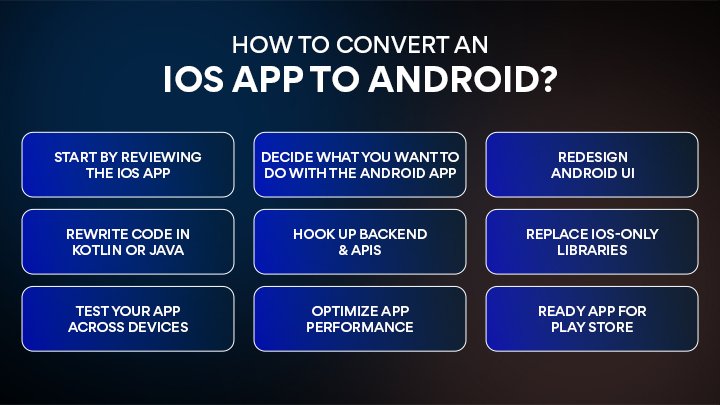
The process includes various steps to reach the final product. It is not about replicating features from an iOS app to an Android platform. It’s more about optimising according to the platform. Here is the defined process to guide the developers:
Start by reviewing the iOS App
First of all, understand the structure of your iOS app along with features and dependencies. Evaluate everything, from which component can be reused and which will need to change according to the Android platform. This analysis will help you make informed planning.
Decide What You Want to Do With the Android App
Decide if your Android version will be a direct copy of iOS or if it will have features embedded on respective platforms. Define clear deliverables based on design, functionality, and performance. This lessens the mismatch of goals with the available development gear.
Redesign Android UI
Android applications are made in compliance with Material Design principles, whereas Apple’s Human Interface Guidelines are different. Change the interface to reflect a genuine Android look by adjusting the layout, types, and the way the user gets around. The point is to stay familiar to Android users.
Rewrite Code in Kotlin or Java
Because iOS apps are developed in Swift or Objective-C, to get your app on Android, you have to develop it using Android-supported languages such as Kotlin or Java.
Many times, the backend code can be reused, but the frontend has to be built from the ground up. This will allow the app to work fast and in a proper way.
Hook Up Backend & APIs
Check whether the APIs in your iOS app are also suitable for Android. The backend integration should be able to handle data exchange, user authentication, and live updates without a hitch. This move ensures the user experience is the same on both platforms.
Replace iOS-Only Libraries
Some third-party tools are limited to one platform. You need to locate the SDKs unique to iOS and select the appropriate Android alternative or develop custom modules. By doing this, your Android edition will not miss out on any of the core features.
Test Your App Across Devices
It is a must to test your app across multiple Android mobiles or devices to check if there are any bugs or any other issues you face. Testing it on different screen sizes, resolutions, and hardware will help you identify UI glitches. Quality assurance is the most critical part of this process.
Optimize App Performance
The way Android manages background processes, memory, and battery is different from iOS. So, it is necessary to fine-tune the app to enable efficient performance, which guarantees smooth running of the app across all supported devices. This subsequently results in the users having a better experience and giving better reviews.
Ready App for Play Store
Develop a valid Play Store listing with an optimized description, visuals, and tags. Work according to the publishing guidelines of Google and privacy requirements. An impeccably optimized store presence not only boosts the brand’s discoverability but also neatly complements the trust factor.
Common Challenges Faced During App Migration from iOS to Android
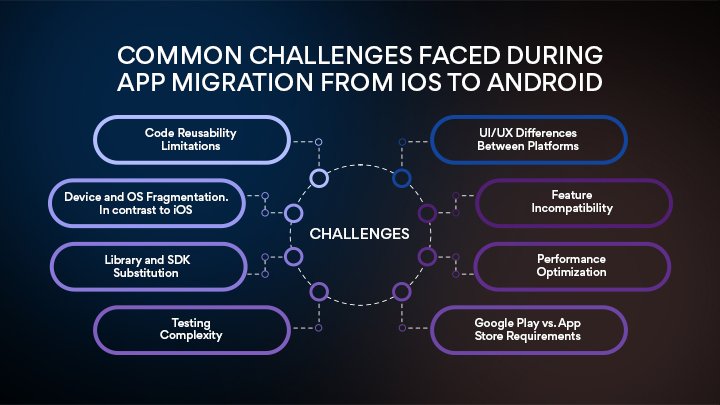
Changing an iOS app to Android is no walk in the park for an iOS or Android app development company. Maintaining core functionality and UX as the main focus, developers struggle with various platform-specific challenges that influence performance, usability, and the overall time frame.
1. Code Reusability Limitations
iOS apps are mostly developed in Swift or Objective-C, whereas Android utilizes Kotlin or Java. Hence, the direct reusing of code is out of the question. Freelance iOS app developers who do not have much experience in Android app development have to refactor or rewrite most of the code from scratch.
2. UI/UX Differences Between Platforms
Apple is bound by the Human Interface Guidelines, whereas Android abides by Material Design. UI elements, layout structures, and navigation flows vary to a great extent between the two types of devices. Merely copying the design will not result in a native Android experience.
3. Device and OS Fragmentation. In contrast to iOS
Android apps can work on multiple devices. These devices can have different screen sizes, resolutions, and other aspects. To make the app work smoothly, the developers have to run in-depth testing and optimization.
4. Feature Incompatibility
Certain features unique to iOS (for example, Face ID, Haptic Touch, or iCloud integration) may not be directly available in Android. In such cases, one either has to redesign these features from scratch or find replacements, which could lead to delays in the schedule.
5. Library and SDK Substitution
The third-party libraries and SDKs that are used in iOS apps may not be available or supported in Android. Get Android developers from dedicated mobile app development services who can successfully find equivalent Android-compatible tools or create certain functionalities from scratch, thus increasing the workload.
6. Performance Optimization
Memory management, background task handling, and UI rendering are done quite differently on Android. Without proper optimization, the Android version may be slower and consume battery at a faster rate when compared to the iOS version.
7. Testing Complexity
QA teams have to test the app on a wide range of devices, screen sizes, and hardware capabilities. This has to be done because of Android’s device fragmentation. Hence, it takes more time and costs more to ensure the quality of Android apps than that of iOS ones.
8. Google Play vs. App Store Requirements
In contrast to Google Play, which offers quicker app approval processes, App Store also has its own set of compliance standards, including permissions, policies, and security requirements. You will need to hire mobile application developers who can modify the app according to the Android publishing standards.

Wrapping Up
When a developer converts an iOS app to an Android one, the process requires a lot of time and calmness. With MSM Coretech, an Android and iOS App development company, you can get out of this hectic process and let our expert team handle it in a professional manner. We specialise in cross-platform mobile app development along with platform migration. We structure the process in various steps to get it right in every aspect. The challenges are taken care of very well.
FAQs
No. The basic functionality can be retained, but the design must adhere to Android’s Material Design guidelines to make the app look familiar to Android users.
Well, generally, the backend and APIs can be reused. But the app interface and the logic have to be redeveloped for Android.
iOS-only functionalities require Android equivalents or new tailored solutions. Certain features might be changed in line with the Android capabilities.
The reason is that Android works with a large number of devices having different screen sizes and hardware. Hence, testing on various devices is necessary to guarantee a good performance.
If done in the right way, your app’s performance will not be affected. Efficient optimization helps the Android app to become fast, low in battery consumption, and stable.

Related Posts
Top 10 Dating App Development Companies in Australia
The way Australians meet and build relationships has changed dramatically over the past decade. Mobile dating apps have become a...
Read More
Top 7 React Native App Development Companies in Australia
Mobile apps are now a vital part of business growth across Australia. From fintech startups in Sydney and healthcare providers...
Read More
Top 5 Android App Development Companies in Australia
Android is the world’s most widely used mobile operating system, making it an ideal platform for businesses looking to reach...
Read More


 Verified Review




 +44 7427829444
 71-75, Shelton Street, Covent Garden, London, United Kingdom, WC2H 9JQ