

Share this article


How Much Does it Cost to Develop a Home Service App like Thumbtack?
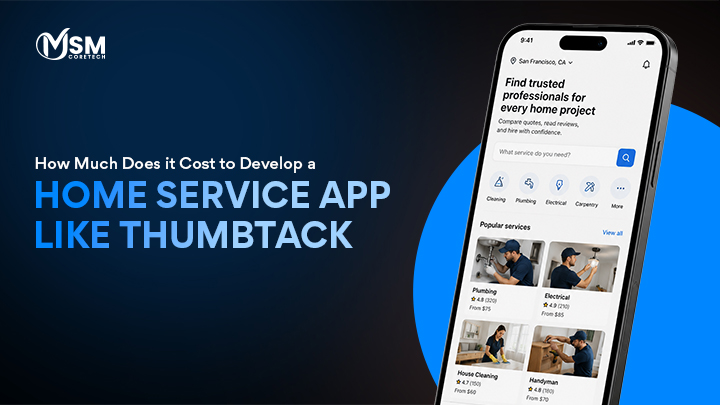
Think about the last time something broke at home. Maybe a pipe started leaking, or your air conditioner stopped working on the hottest day of the year. What did you do? You probably grabbed your phone and searched for someone who could fix it fast. That’s exactly the kind of problem home service apps solve, and they’re solving it for millions of people every single day.
The on-demand home services market is growing at a pace that’s hard to ignore. According to Grand View Research, the global on-demand home services market was valued at USD 4.65 billion in 2023 and is expected to grow at a compound annual growth rate (CAGR) of 51.4% from 2024 to 2030.
With more homeowners preferring convenience over traditional hiring methods, entrepreneurs and businesses are racing to build platforms that connect customers with skilled professionals. Thumbtack is one of the biggest names in this space, and it has shown just how profitable and scalable this kind of app can be.
If you’re wondering about the cost to develop a home service app and whether building something similar makes sense for your business, you’ve landed in the right place. In this article, we’ll walk you through everything from understanding what these apps do to how Thumbtack works, to what it actually costs to build one from scratch. Let’s get into it.
Also Read: How On-Demand App Development Can Drive Business Growth
What is a Home Service App?
A home service app is essentially a digital marketplace that connects homeowners or renters with local professionals who offer various household services. These services can range from plumbing, electrical work, and HVAC repairs to cleaning, painting, lawn care, moving, and even pet grooming. Think of it as a two-sided platform. On one side, you have customers who need help around the house, and on the other, you have vetted service providers who are ready to do the job.
The beauty of these apps is in their simplicity for the end user. Instead of asking neighbors for referrals, flipping through a phone directory, or trusting random online listings, users can open the app, describe what they need, browse profiles of nearby professionals, read reviews, compare pricing, and book someone all within a few minutes. Everything happens digitally, from the booking to the payment.
From the service provider’s side, the app works just as well. Instead of spending money on advertising or waiting for word-of-mouth referrals, professionals can create a profile, showcase their skills and past work, set their availability, and start getting job requests almost immediately. It’s a win-win setup.
The Story Behind the Thumbtack App and How It Works
Thumbtack was founded back in 2008 by Marco Zappacosta, along with co-founders Jonathan Swanson, Sander Daniels, and Jeremy Tunnell. The company was built on a simple but powerful idea: make it easy for people to find local professionals for just about any job. In its early days, Thumbtack operated much like a lead-generation service, where service providers would pay for leads when a customer reached out to them.
Over the years, Thumbtack has evolved significantly. It went through multiple funding rounds and raised over $700 million in venture capital, with investors including Sequoia Capital, Google Capital (now CapitalG), and Tiger Global Management. By the early 2020s, Thumbtack had grown into one of the most recognized home services platforms in the United States, available in all 50 states and claiming over 10 million projects matched annually.
How Thumbtack Works- Step by Step
Thumbtack’s model is designed to be incredibly easy to use, whether you’re a homeowner or a contractor. Here’s how the process works on the customer side:
Post Your Project
A user visits the app or website and describes what they need, for example, ‘I need my kitchen repainted’ or ‘I need a plumber to fix a leaking pipe.’ They answer a few quick questions to give providers the right context.
Get Matched
Thumbtack uses its algorithm to match the request with relevant local professionals who have the right skills and availability. The customer then receives quotes or can browse suggested pros.
Compare and Choose
The user looks at professional profiles, reads reviews, compares quotes, and selects the person they feel most comfortable hiring.
Hire and Pay
Once a pro is selected, the user hires them directly through the app. Payment is handled in-app after the job is done.
Leave a Review
After the service is complete, the customer can rate the experience, which helps future users make informed decisions.
On the professional side, Thumbtack allows service providers to sign up, complete background checks, and create detailed business profiles. They can also set their preferences for the kinds of jobs they want, location, job type, and budget range, and Thumbtack only sends them relevant leads. Providers pay Thumbtack either through a lead-based model (paying per contact from a potential customer) or through a subscription-based plan, depending on the region and service category.
What makes Thumbtack stand out is its focus on trust and transparency. The platform heavily emphasizes verified reviews, background checks for professionals, and clear pricing, all of which reduce the anxiety customers feel about inviting someone into their home. This approach has made it a go-to platform for millions of Americans dealing with everything from minor repairs to full-scale home renovations.
Thumbtack’s success story is clear proof of concept for anyone who wants to build a home service app like Thumbtack. The demand is real, the monetization is solid, and the model scales beautifully as you add more cities and service categories.
Also Read: 7 Proven UX Design Guidelines for Modern On-Demand Apps
Types of Home Service Apps You Can Build
Before you jump into development costs, it’s worth knowing that not all home service apps are built the same way. The type of app you build will directly influence how much you spend. Here are the main models you can follow:
1. Aggregator Model
This is the marketplace model like Thumbtack itself. The platform lists multiple service providers, and customers can browse, compare, and choose who they want to hire. The app owner doesn’t employ the professionals directly; they simply facilitate the connection. Revenue comes through lead fees, commissions on bookings, or subscription plans for providers. This model is highly scalable but requires strong marketing to build up both sides of the marketplace.
2. On-Demand Service Model
Think of this like Uber, but for home services. A customer opens the app, requests a service, and the nearest available provider is automatically dispatched. This model is great for high-frequency, lower-complexity services like house cleaning, handyman work, or pest control. It offers the fastest turnaround for customers but requires a solid supply of providers in every area to be effective.
3. Niche Service Model
Instead of trying to cover every home service imaginable, a niche app focuses on one specific category, say, just HVAC repair, or just house cleaning, or just landscaping. This makes it easier to build a focused brand, acquire targeted users, and create a streamlined experience. Many successful startups have begun with a niche approach before expanding.
4. Freelancer Marketplace Model
Similar to platforms like Fiverr but for home services, this model lets independent handymen, cleaners, or contractors create profiles, showcase their portfolio, and get hired directly by customers. It’s flexible and empowers individual service providers to build their own client base through the platform.
The model you choose will affect your tech stack, the number of features you need, and ultimately your development budget. Keep this in mind as we move into the cost breakdown.
Factors That Affect the Cost to Develop a Home Service App
The cost to develop a home service app is not a fixed number it depends on many variables. Understanding these factors will help you plan your budget more accurately and avoid surprises down the road.
1. App Complexity and Features
This is the biggest driver of cost. A basic app with simple user registration, a service listing, and a booking form will cost far less than a full-featured marketplace with real-time tracking, AI-based professional matching, dynamic pricing, in-app video consultations, and detailed analytics. Every additional feature adds hours to the development timeline, which adds to the bill.
2. Platform Choice- iOS, Android, or Both
If you want to launch on just one platform (say, iOS), your costs will be lower. But if you want to reach the maximum audience, you’ll need both iOS and Android apps. Some teams use cross-platform frameworks like Flutter or React Native to build once and deploy to both platforms, which can reduce costs compared to building two fully separate native apps.
3. UI/UX Design
Design is not just about making the app look pretty, it’s about making it easy and enjoyable to use. Poor design leads to user drop-offs. A well-thought-out UI/UX requires wireframing, prototyping, user testing, and multiple revision rounds. High-quality design takes time, and time costs money. Expect a significant portion of your budget to go toward this.
4. Backend Development and Infrastructure
The backend is the engine that runs everything behind the scenes: user data, booking logic, payment processing, push notifications, admin controls, and more. A robust, scalable backend built on cloud infrastructure (AWS, Google Cloud, Azure) is essential if you want your app to grow without falling apart. This is typically one of the most expensive parts of development.
5. Third-Party Integrations
Your app will need to connect with various third-party services. Payment gateways like Stripe or Razorpay, map and location services like Google Maps, SMS/notification services like Twilio, and analytics tools all need to be integrated. Each integration requires development time, and some come with their own licensing or usage fees.
6. Development Team Location
Where your development team is based has a huge impact on cost. Developers in North America or Western Europe typically charge between $100 to $200 per hour. In Eastern Europe, rates range from $50 to $100 per hour. In South Asia and Southeast Asia, skilled developers are available at $25 to $60 per hour. Choosing the right location based on your budget and quality expectations is a critical decision.
7. Testing and Quality Assurance
Before launching, your app needs thorough testing: functional testing, performance testing, security testing, and user acceptance testing. Skipping or cutting corners on QA is one of the costliest mistakes a startup can make. Budget for a dedicated QA process to ensure your app launches without critical bugs.
8. Post-Launch Maintenance
Building the app is just the beginning. After launch, you’ll need ongoing maintenance to fix bugs, update the app for new OS versions, add new features, and keep your servers running. Typically, maintenance costs around 15–20% of the original development cost per year.
Also Read: Target Audience for Dating Apps
Steps of Development For a Home Service App
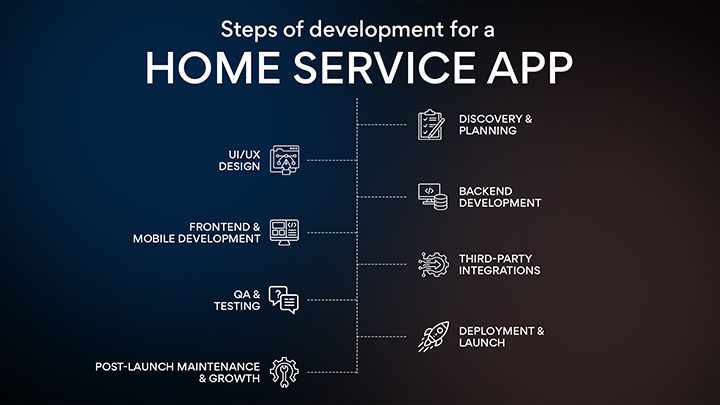
Building a home service app like Thumbtack is not something that happens overnight. It’s a structured, multi-phase process where each step to develop an app on the one before it. Rush any phase, and you pay for it later in bugs, in user drop-offs, or in costly rebuilds. Here’s exactly how a professional development team takes your idea from a blank page to a live, working product.
Discovery & planning
This is where everything starts. You sit down with your development team and clearly define what the app needs to do, who it’s for, and how it will make money. The team studies your competitors, maps out user journeys for both customers and service providers, and creates a full project scope. Skipping this step is one of the most common reasons apps go over budget.
UI/UX design
Before a single line of code is written, designers build wireframes, simple black-and-white screen layouts showing how the app will flow. Once approved, these evolve into high-fidelity mockups with colors, fonts, icons, and interactions. A clickable prototype is created so you can tap through the app and feel the experience before development begins. Good design here saves weeks of rework later.
Backend development
This is the engine room of your app. Backend developers build the APIs, set up the database, and write all the business logic booking systems, payment flows, matching algorithms, notification systems, and admin controls. A well-built backend is what allows your app to handle thousands of users without crashing. It also determines how securely user data and payments are handled.
Frontend & mobile development
Frontend developers take the approved designs and turn them into real, interactive screens on iOS and Android (and a web portal if needed). Every button, screen, animation, and input field gets built and connected to the backend APIs. If you’re building natively for both platforms, two separate teams work in parallel. With cross-platform frameworks like React Native or Flutter, one team handles both, which saves time and cost.
Third-party integrations
At this stage, all external services get wired into the app. Payment gateways are configured and tested. Google Maps is integrated for location features. SMS and push notification services are connected. Background check APIs are plugged in for provider verification. Analytics tools are added to track user behaviour. Each integration needs to be set up, tested, and edge-case-proofed before the app can be considered production-ready.
QA & testing
Nothing goes live without thorough testing. QA engineers run the app through hundreds of scenarios what happens if a payment fails mid-booking? What if two providers accept the same job at the same time? What if the user loses internet during checkout? Functional testing checks that every feature works as expected. Performance testing checks whether the app handles high traffic. Security testing looks for vulnerabilities. User acceptance testing (UAT) confirms everything feels right from a real user’s perspective.
Deployment & launch
The app is submitted to the Apple App Store and Google Play Store for review. The cloud infrastructure is set up and configured, and servers, databases, CDNs, and monitoring tools are all activated. CI/CD pipelines are put in place so future updates can be deployed quickly and safely. A soft launch (to a limited group of users) is often recommended before the full public launch to catch any last-minute issues at a real-world scale.
Post-launch maintenance & growth
Launch day is not the finish line; it’s the starting gun. After launch, the team monitors performance metrics and user feedback closely. Bugs that only appear in the real world get fixed in rapid patches. New features requested by users are prioritised and added in sprints. The app gets updated whenever Apple or Google releases new OS versions. As your user base grows, infrastructure is scaled up to handle the increased load. A well-maintained app is what separates platforms that last from those that fade out in 6 months.
Also Read: Know About On Demand Mobile App Development
Estimated Cost to Develop a Home Service App Like Thumbtack- By App Tier
Now let’s talk numbers. One of the most common questions we hear is: ‘Can you just give me a number?’ The honest answer is that the cost to develop a home service app depends heavily on scope, team, and location. But we can give you realistic ranges based on four app tiers from a lean MVP all the way up to a full enterprise-grade platform like Thumbtack.
| App Tier | Key Features Included | Timeline | Estimated Cost (USD) |
|---|---|---|---|
| Basic MVP | User & provider registration, service listings, simple booking, payment integration, email notifications, basic admin panel | 3–5 months | $20,000 – $40,000 |
| Standard App | Everything in MVP + in-app messaging, GPS tracking, ratings & reviews, provider dashboard, promo codes, push notifications | 6–9 months | $50,000 – $100,000 |
| Advanced App | Everything in Standard + real-time tracking, AI matching, video consultation, multi-currency, advanced analytics, and background check API | 9–14 months | $100,000 – $180,000 |
| Enterprise / Thumbtack-Level | Full feature set + custom AI/ML engine, white-label option, multi-city/region support, enterprise admin suite, dedicated DevOps, SLA support | 14–20 months | $180,000 – $300,000+ |
These ranges are based on industry benchmarks and typical project scopes at MSM Coretech. The actual number for your project could fall anywhere within these ranges, depending on specific feature choices, design complexity, and team configuration. The best next step is always to get a detailed, itemized quote from your development partner after a proper discovery session.
Cost Breakdown by Development Phase
Understanding how your budget gets allocated across different phases of development helps you track spending, set realistic milestones, and make smarter trade-offs. Many clients ask: ‘Where does all the money go?’ and this section answers that question directly. Here is how a typical home service app development budget breaks down phase by phase.
| Development Phase | What It Includes | % of Total Budget | Approx. Cost Range |
|---|---|---|---|
| Discovery & Planning | Requirement gathering, competitor analysis, project scope, wireframe brief, timeline planning | 5–8% | $2,500 – $15,000 |
| UI/UX Design | Wireframes, high-fidelity mockups, design system, prototyping, user testing & iterations | 10–15% | $5,000 – $30,000 |
| Frontend Development | Customer app (iOS + Android), provider app, web portal UI implementation | 20–25% | $15,000 – $60,000 |
| Backend Development | APIs, database architecture, business logic, server setup, third-party integrations | 25–35% | $20,000 – $80,000 |
| Admin Panel | Web-based dashboard, reporting, user management, dispute tools, CMS features | 8–12% | $6,000 – $25,000 |
| Third-Party Integrations | Payment gateway, maps API, SMS, push notifications, background checks | 5–10% | $4,000 – $20,000 |
| QA & Testing | Functional, performance, security, regression, and UAT testing across all platforms | 8–12% | $5,000 – $25,000 |
| Deployment & DevOps | Cloud setup, CI/CD pipelines, server configuration, app store submission | 3–5% | $2,000 – $10,000 |
| Post-Launch Maintenance (Yr 1) | Bug fixes, OS updates, feature enhancements, server monitoring | 15–20% of build cost/yr | $8,000 – $50,000/yr |
Looking at this breakdown, a few things stand out. Backend development tends to consume the largest portion of the budget because it’s where most of the business logic lives, booking systems, payment flows, matching algorithms, and data management all happen here. UI/UX design is the second largest investment, and it pays off directly in user retention and conversion rates. Never underestimate the cost and value of great design.
Also, notice that post-launch maintenance is listed as a percentage of the build cost per year. Many first-time founders overlook this entirely; they budget for the build but not for keeping the product alive and growing. A well-maintained, regularly updated app outperforms a stagnant one in every metric that matters, from user ratings to search rankings.
Cost to Develop Home Service App by Development Team Region
One of the most powerful levers you have for controlling your development budget is where you choose to hire your development team. The same app can cost three to four times more to build in San Francisco than in Bangalore, and the quality gap, when you work with the right partner, is often smaller than people assume. Here’s a clear comparison of development costs by region to help you make an informed decision.
| Region | Avg. Hourly Rate | MVP Estimate | Full App Estimate | Best For |
|---|---|---|---|---|
| North America (US/Canada) | $100 – $200/hr | $60,000 – $120,000 | $200,000 – $400,000+ | Highest quality, enterprise projects |
| Western Europe (UK/Germany) | $80 – $150/hr | $50,000 – $100,000 | $180,000 – $350,000 | Strong design & compliance needs |
| Eastern Europe (Ukraine/Poland) | $40 – $80/hr | $25,000 – $60,000 | $100,000 – $200,000 | Quality + cost balance |
| South Asia (India/Pakistan) | $20 – $50/hr | $15,000 – $40,000 | $60,000 – $150,000 | Budget-conscious, scalable teams |
| Southeast Asia (Philippines/Vietnam) | $25 – $55/hr | $18,000 – $45,000 | $70,000 – $160,000 | Growing talent pool, good English |
| Latin America (Brazil/Colombia) | $35 – $70/hr | $22,000 – $55,000 | $90,000 – $180,000 | US timezone alignment |
A few important caveats here. Cheaper doesn’t always mean worse, and expensive doesn’t always mean better. What matters most is the team’s experience with on-demand marketplace apps specifically, their communication practices, their development process, and the quality of their past work.
Many businesses, including fast-growing startups and established enterprises, successfully build home service apps like Thumbtack by partnering with skilled teams in South Asia or Eastern Europe at a fraction of the cost of local development. The key is doing thorough due diligence: reviewing portfolios, checking references, and starting with a small paid discovery phase before committing to the full build.
Also Read: Target Audience for Dating Apps
Hidden and Ongoing Costs You Need to Plan For
Here’s something a lot of developers and agencies won’t tell you upfront: the cost to build your app is just one part of the total investment. There are ongoing operational costs that kick in the moment your app goes live, and if you haven’t budgeted for them, they can cause serious financial strain. Let’s be transparent about what those costs look like.
| Cost Item | Description | Estimated Annual Cost |
|---|---|---|
| Cloud Server Hosting | AWS/GCP/Azure compute, storage, and bandwidth scale with user count | $2,400 – $24,000/yr |
| Third-Party API Fees | Google Maps, Twilio SMS, payment processing fees (typically 1.5–3% per transaction) | $1,200 – $12,000/yr |
| App Store Fees | Apple Developer Program ($99/yr) + Google Play ($25 one-time) | ~$130 + one-time $25 |
| Background Check API | Per-check fees via Checkr or similar (cost passed to provider or absorbed) | $5 – $30 per check |
| SSL Certificate & Security | Domain SSL, security audits, penetration testing | $500 – $5,000/yr |
| Customer Support Tools | Helpdesk software (Freshdesk, Zendesk), live chat tools | $600 – $6,000/yr |
| Marketing & User Acquisition | Paid ads, ASO, SEO content, influencer campaigns to grow both sides | $5,000 – $50,000+/yr |
| Legal & Compliance | Terms of service, privacy policy, GDPR/local compliance, business registration | $1,000 – $10,000+ |
| App Updates & New Features | Ongoing development sprint costs post-launch | $10,000 – $60,000/yr |
The biggest takeaway from this table is that running a home service platform is an ongoing business expense, not a one-time project. Cloud hosting, API fees, support tools, and marketing all compound as your user base grows. The good news is that most of these costs scale with revenue, meaning that as you make more money, you can afford more infrastructure. But you should build a realistic financial model that accounts for at least 12 months of operational costs beyond the initial development budget.
Must-Have Features to Build a Home Service App Like Thumbtack
If you’re serious about building something competitive, here’s the full list of features you should plan for across all three app panels Customer App, Provider App, and Admin Panel.
Customer App Features
- Easy sign-up and login (email, phone, social login)
- Service category browser with search and filters
- Request a quote or instant booking option
- View and compare professional profiles
- Real-time tracking of the service provider
- In-app chat and call options
- Multiple secure payment options
- Booking history and re-booking
- Ratings, reviews, and flagging
- Push notifications and reminders
Service Provider App Features
- Professional profile creation with portfolio upload
- Availability calendar and scheduling tools
- Job request management (accept, reject, reschedule)
- In-app messaging with customers
- Earnings dashboard and payout tracking
- Review and rating management
- Service area and job preference settings
- Push notifications for new job requests
Admin Panel Features
- User management (customers and providers)
- Booking and transaction monitoring
- Commission and revenue management
- Dispute resolution tools
- Content management (categories, banners, FAQs)
- Analytics and reporting dashboard
- Push notification broadcasting
- Provider verification and background check management
Technology Stack for a Home Service App
| Category | Technology / Options | Purpose |
|---|---|---|
| Mobile (Cross-platform) | React Native / Flutter | Single codebase that deploys to both iOS and Android — saves time and budget |
| Mobile (iOS native) | Swift | Best performance and full access to Apple platform APIs |
| Mobile (Android native) | Kotlin | Modern, concise language recommended by Google for Android development |
| Frontend | React.js / Next.js | Customer-facing web portal and admin dashboard |
| Backend | Node.js (Express) / Python (Django / FastAPI) | API endpoints, business logic, and server-side operations — both are fast and scalable |
| Database (Relational) | PostgreSQL / MySQL | Stores users, bookings, and structured transactional data |
| Database (NoSQL) | MongoDB | Flexible document storage for chat logs and dynamic provider profiles |
| Cloud Hosting | AWS / Google Cloud / Microsoft Azure | Scalable server infrastructure, storage, and CDN delivery |
| Authentication | JWT / OAuth 2.0 | Secure login, token-based session management, and social sign-in |
Choosing the right technology stack is a major decision that affects your app’s performance, scalability, and long-term maintenance. Here’s what a modern home service app like Thumbtack would typically be built on:
The right combination depends on your specific requirements, your team’s expertise, and your scalability goals. A good development partner will help you make these decisions based on your business model and target audience.
Monetization Strategies for Your Home Service App
One of the most important questions before you build is: how will your app make money? Here are the most common and proven monetization strategies for home service platforms:
Commission Model
The platform takes a percentage cut, typically 10% to 30%, from every transaction completed through the app. This is straightforward and scales well as your transaction volume grows. Thumbtack has used a variation of this model.
Lead-Based Pricing
Service providers pay a fee each time a customer contacts them or expresses interest in their services. This can be a flat fee per lead or vary by service type and job size. It’s a popular model because providers only pay when they get real business opportunities.
Subscription Plans for Providers
Professionals pay a monthly or annual subscription fee to be listed on the platform, appear in search results, or access premium features like profile highlights, early access to leads, or detailed analytics. This creates a predictable, recurring revenue stream for the platform.
Featured Listings and Ads
Providers can pay extra to have their profiles featured prominently in search results or shown to a wider audience. This is similar to how advertising works on Google or Yelp, it gives motivated providers a way to stand out.
Freemium Model
The basic version of the app is free for both customers and providers, but premium features like advanced analytics, unlimited quotes, or priority customer support require a paid upgrade. This lowers the barrier to entry and builds your user base before monetizing.
Also Read: Outsource Mobile App Development
Why MSM Coretech is the Right Partner to Build a Home Service App Like Thumbtack
If you’ve read this far, you’re probably serious about building something real. And that means you need a development partner who knows what they’re doing, not just technically, but strategically. That’s where MSM Coretech comes in.
MSM Coretech is a leading home service app development company with deep expertise in building on-demand platforms that are scalable, user-friendly, and built to last. Whether you want to build a home service app like Thumbtack from the ground up or launch with a focused MVP and grow from there, MSM Coretech has the team, the process, and the track record to make it happen.
What Makes MSM Coretech Stand Out?
- End-to-End Development: MSM Coretech handles the entire development lifecycle, from discovery, design, development, testing, deployment, and maintenance. You get a single point of accountability from day one to launch day.
- Custom Solutions, Not Templates: Every business is different. MSM Coretech builds custom solutions tailored to your specific business model, target market, and feature requirements, not cookie-cutter apps that look like everyone else’s.
- Cross-Platform Expertise: Whether you need native iOS and Android apps or a cross-platform solution using React Native or Flutter, MSM Coretech has the technical chops to deliver both and help you decide which approach makes more sense for your budget and goals.
- Transparent Pricing: No hidden fees, no surprise invoices. MSM Coretech provides detailed, transparent project estimates so you always know where your money is going.
- Scalable Architecture: Apps built by MSM Coretech are designed for growth. Whether you’re starting with one city or planning a national launch, the infrastructure is built to scale without needing a complete rebuild.
- Dedicated Support Post-Launch: MSM Coretech doesn’t disappear after your app goes live. Their team offers ongoing maintenance, feature updates, and performance optimization so your app stays competitive.
When you’re ready to develop a home service app like Thumbtack, choosing the right tech partner is just as important as having the right idea. MSM Coretech brings together technical expertise, business understanding, and a genuine commitment to your success. They’ve helped businesses across industries launch and scale digital platforms, and they can do the same for you.
Reaching out to MSM Coretech for a free consultation is the smartest first step you can take. Share your vision, ask your questions, and get a clear picture of what it will take to bring your app to life.
Conclusion
The on-demand home services industry is booming, and the timing to enter this market has never been better. Apps like Thumbtack have already proven that people are willing to pay for convenience, trust, and speed when it comes to getting work done around the house. The question is no longer whether this model works; it clearly does. The question is whether you’re ready to take the leap and build something meaningful in this space.
The cost to develop a home service app will vary based on your feature set, platform choice, and development partner, but with the right planning and the right team, it’s an investment that can deliver strong returns. From a focused MVP starting at $20,000 to a full-featured platform at $250,000 or more, there’s a path for every budget and vision.
What matters most is starting smart. Define your target market, decide on your core features, choose a monetization model that fits your business, and partner with a development company that genuinely understands your goals. If you’re ready to build a home service app like Thumbtack, MSM Coretech is the partner who can help you get there from the first line of code to your first thousand users and beyond. The next great home service platform could be yours. All it takes is the decision to begin.
FAQs
The cost to develop a home service app like Thumbtack typically ranges from $20,000 to $150,000+. Pricing depends on app features, platform selection, UI/UX design, and development complexity. Advanced features like real-time tracking, AI recommendations, and video consultations increase the budget.
A Thumbtack-like app should include user registration, service listings, booking, payments, and ratings. Real-time notifications and provider profiles are also important for a better user experience. Admin panel and analytics help businesses manage operations efficiently.
A basic home service app may take around 3 to 5 months to develop completely. A medium or advanced app with custom features can take 6 to 12 months. Development time also depends on testing, integrations, and app platform requirements.
Developers commonly use Flutter or React Native for cross-platform mobile app development. Backend technologies may include Node.js, Laravel, or Python for scalable performance. Cloud hosting, APIs, and secure payment gateways are also integrated for smooth functionality.
Yes, home service apps can generate revenue through commissions, subscriptions, and featured listings. You can also earn through advertisements and service provider promotions.
Offering premium memberships and instant booking features can further increase profits.

Related Posts

10 Key Applications of AI in the Food Industry (2026)
Walk into any restaurant kitchen, grocery warehouse, or food delivery control room today, and you will find something quietly running...
Read More
How To Develop An App Like YouTube Music: A Complete Guide
Music is now a part of our everyday life. People listen to songs while getting ready in the morning, working,...
Read More
Must-Have Features in Fintech Apps & Digital Financial Platforms
Think about how often you use your phone to pay bills, send money, shop online, or check your bank balance....
Read More


 Verified Review




 +44 7427829444
 71-75, Shelton Street, Covent Garden, London, United Kingdom, WC2H 9JQ