

Share this article


Top 10 Digital Payment Apps for Secure Online Transactions in 2026
Cash is quietly fading into the background, and 2026 is the year digital payment apps have taken over almost every kind of transaction, from splitting a dinner bill to paying international suppliers. Whether you are tapping your phone at a coffee shop, sending rent to a roommate, or checking out on an online store, chances are a digital wallet or a mobile payment app is doing the heavy lifting behind the scenes. This shift has not happened by accident. Faster smartphones, better internet access, and growing comfort with contactless payment apps have made cashless living the default rather than the exception.
Digital payment apps have become essential simply because they save time, cut down friction, and offer a level of security that cash and even old-school card swipes cannot match. Cashless transactions mean fewer trips to the ATM, instant transfers between friends, and built-in protection against fraud through encryption and biometric checks. In this guide, we will walk through the latest market numbers, explain what a digital payment app actually is, break down the 10 best digital pay apps of 2026, and help you figure out which one fits your lifestyle, whether you are a student, a freelancer, a frequent traveller, or a small business owner.
Also Read: FinTech App Design Guide
Digital Payments Market in 2026 (Latest Statistics)
Before we get into the apps themselves, it helps to understand just how big and how fast this industry is moving. The numbers below come from well-known research firms and industry trackers, and they show why every bank, retailer, and fintech app development company is racing to build better payment products.
- Global digital payment market size: Statista projects the worldwide digital payments market will process a total transaction value of US$37.45 trillion in 2026, with mobile point-of-sale payments alone accounting for roughly US$28.32 trillion of that figure.
- Number of digital wallet users worldwide: Industry trackers estimate that global digital wallet users have already crossed 5.2 billion, with wallets now capturing about 53% of all online purchases made anywhere in the world.
Other well-respected sources worth exploring for deeper research include Fortune Business Insights, which has tracked the digital payment market’s climb toward a multi-trillion-dollar transaction value, and McKinsey’s Digital Payments research, which regularly covers how banks and fintechs are responding to real-time payment rails and embedded finance. Together, these numbers make one thing very clear: digital payment apps are no longer a nice-to-have convenience; they are the backbone of how money moves in 2026.

What Is a Digital Payment App?
A digital payment app is simply a piece of software, usually installed on your phone, that lets you send, receive, or store money electronically instead of using physical cash or a plastic card. Think of it as a digital version of your wallet, bank branch, and cheque book rolled into one convenient screen. You link a bank account, debit card, credit card, or sometimes cryptocurrency to the app, and from there you can pay bills, shop online, send money to friends, or tap your phone at a store checkout counter.
So how do digital payment apps actually work behind the scenes? When you make a payment, the app does not usually send your raw card number to the merchant. Instead, it creates a one-time digital token that represents your payment information, a process called tokenization. This token is sent through secure, encrypted channels to the payment network and your bank, which approve or decline the transaction within seconds. Because the real card number never actually travels across the internet in plain form, secure payment apps built this way are considerably harder for hackers or scammers to exploit compared to typing your card details into a random website.
Types of Digital Payments
- Mobile Wallets: Apps like Google Wallet, Apple Wallet, and Samsung Wallet store your cards, tickets, and IDs on your phone and let you pay by simply tapping at checkout using near field communication (NFC).
- UPI Apps: Popular mainly in India, apps like PhonePe and Paytm use the Unified Payments Interface to move money directly between bank accounts in real time, without needing card numbers at all.
- Bank Payment Apps: These are apps built by banks themselves, letting customers transfer funds, pay bills, and manage accounts directly, often integrated with the bank’s existing security infrastructure.
- Cryptocurrency Payment Apps: Apps such as Cash App allow users to buy, hold, and sometimes spend digital currencies like Bitcoin alongside regular fiat money transfers.
- Contactless Payment Apps: These rely on NFC or QR codes to let you pay by tapping or scanning, cutting checkout time down to a couple of seconds and reducing physical contact at the point of sale.
Also Read: Build Your Own Payment Gateway
How We Selected the Best Digital Payment Apps
With dozens of digital wallet apps competing for attention, we did not want to just rank the most downloaded names. Instead, we looked at the practical, everyday factors that actually matter when you are trusting an app with your money. Here is what we weighed while putting this list together.
- Security: How well the app protects your data through encryption, tokenization, and fraud monitoring.
- Ease of use: Whether the interface is simple enough for a first-time user to send money without confusion.
- Transaction speed: How quickly payments and transfers actually settle, including instant versus standard transfer options.
- Availability: The number of countries and regions where the app can be downloaded and used.
- Supported banks: How many banks and card networks the app can connect with.
- Merchant acceptance: How widely the app is accepted at online stores and physical checkout counters.
- Fees: Transparency and fairness of transaction charges, currency conversion fees, and withdrawal costs.
- Customer support: Availability of responsive help through chat, phone, or email when something goes wrong.
- International transfers: How well the app handles sending money across borders and converting currencies.
- Rewards and cashback: Whether the app offers meaningful loyalty perks, discounts, or cashback for regular use.
Also Read: How to Build a Mobile Banking App?
10 Best Digital Pay Apps for Secure Online Payments in 2026
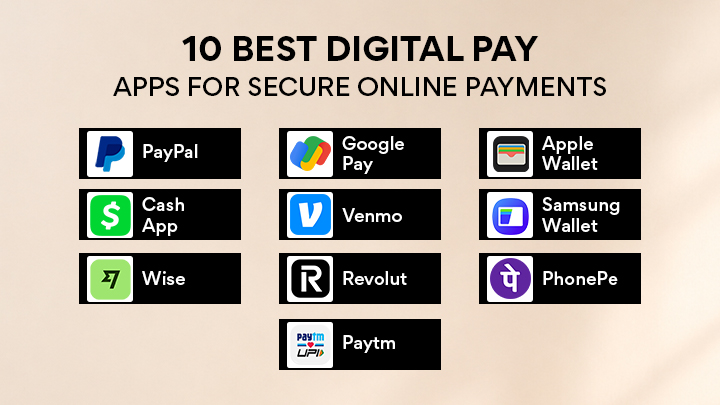
Here is our detailed look at the best digital pay apps of the year, covering everything from everyday mobile wallets to specialist international transfer tools. Whichever one you pick, all ten are widely recognised as secure payment apps that take fraud prevention seriously.
1. PayPal
PayPal has been around for over two decades and remains one of the most recognised online payment apps in the world. It works almost everywhere online stores accept digital checkout, and it has built a strong reputation around buyer protection, which makes it a comfortable choice for people who shop frequently on unfamiliar websites.
Key Features
- One-tap checkout at millions of online stores
- PayPal Business tools for invoicing and merchant payments
- Send and request money from friends and family instantly
- Currency conversion for international shopping
Pros
- Extremely wide merchant acceptance
- Strong buyer protection on eligible purchases
- Works well for freelancers invoicing clients abroad
- Long track record of reliability
Cons
- Currency conversion fees can be higher than dedicated transfer apps
- Customer support can feel slow during disputes
- Account holds occasionally frustrate business users
- Best For: Online shoppers and freelancers who need trusted buyer protection and easy international payments.
- Platform Availability: Available on iOS, Android, and web browsers worldwide.
- Pricing/Fees: Free for personal transfers funded by bank or balance; card-funded transfers and business transactions carry a percentage-based fee.
Security Features
- Buyer protection that refunds eligible purchases that never arrive or do not match the description
- Encrypted international payments across more than 200 markets
- Dedicated fraud monitoring for business payments and seller accounts
2. Google Pay
Google Wallet has evolved from a simple payment app into a full digital identity and payments hub for Android users. It combines contactless card payments with loyalty cards, transit passes, and even digital IDs, all protected behind Google’s security infrastructure.
Key Features
- NFC tap-to-pay at supported terminals
- Stores loyalty cards, boarding passes, and event tickets
- Peer-to-peer money transfers within the app
- Integration with Google account and services
Pros
- Extremely smooth NFC payments experience
- Works seamlessly across the Android ecosystem
- No extra cost to use for personal payments
Cons
- Some features are region-limited
- Fewer advanced business tools compared to PayPal
- Requires a compatible NFC-enabled device
- Best For: Android users who want one app to handle payments, loyalty cards, and travel passes together.
- Platform Availability: Available on Android devices, with a lighter web experience for some regions.
- Pricing/Fees: Free to use for standard peer-to-peer and in-store payments.
Security Features
- Secure tokenization so real card numbers are never shared with merchants
- Device-level screen lock requirement before payments go through
- Real-time fraud detection tied to Google’s account security systems
3. Apple Wallet (Apple Pay)
Apple Wallet is the default choice for iPhone owners who want fast, private, and secure payments. It leans heavily on Apple’s hardware-level security, using Face ID or Touch ID to confirm every payment before it goes through.
Key Features
- Tap-to-pay using NFC at millions of retail terminals
- Stores boarding passes, tickets, keys, and IDs
- Apple Cash for sending money to contacts
- Works across iPhone, Apple Watch, iPad, and Mac
Pros
- Face ID authentication adds a strong layer of privacy
- Merchants never see your actual card number
- Deeply integrated with iOS for a smooth experience
- Widely accepted at contactless terminals worldwide
Cons
- Limited to Apple hardware
- Some banks and countries have partial support
- Less flexible for Android or Windows users
- Best For: iPhone and Apple Watch owners who prioritise privacy and a polished, tap-to-pay experience.
- Platform Availability: Available on iPhone, Apple Watch, iPad, and Mac.
- Pricing/Fees: Free for personal use; Apple Cash transfers funded by a debit card are free; credit-funded instant transfers carry a small fee.
Security Features
- Face ID and Touch ID authentication for every transaction
- Device Account Numbers replace real card numbers on the secure element chip
- Privacy-first design where Apple does not store transaction details tied to your identit
4. Cash App
Cash App started as a simple way to send money between friends and has grown into a broader financial app that also supports stock investing and Bitcoin. It is especially popular in the United States for its casual, straightforward feel.
Key Features
- Instant peer-to-peer money transfers using a unique $Cashtag
- Cash Card, a customisable debit card linked to your balance
- Fractional stock investing directly in the app
- Buy, hold, and send Bitcoin
Pros
- Very fast instant transfers between users
- Simple, casual interface that is easy for beginners
- Combines banking, investing, and crypto in one app
- Direct deposit support for paychecks
Cons
- Limited international transfer support
- Instant transfers to a bank carry a small fee
- Customer support can be difficult to reach for account issues
- Best For: Everyday users in the US who want fast transfers plus casual investing and Bitcoin access in one app.
- Platform Availability: Available on iOS and Android, primarily for US and UK users.
- Pricing/Fees: Free standard transfers; instant transfers to a linked bank charge a small percentage fee.
Security Features
- PIN, Face ID, or Touch ID lock for opening the app
- Encrypted transactions with fraud alerts for unusual activity
- Ability to lock the Cash Card instantly from within the app
5. Venmo
Venmo turned splitting bills and repaying friends into something almost social, with a feed showing (non-financial) transaction activity between contacts. It remains one of the most popular mobile payment apps among younger users in the US for casual, everyday payments.
Key Features
- Social feed for sharing (not amounts) of transactions with friends
- QR code payments for quick in-person transfers
- Venmo debit and credit card options
- Business profiles for small merchants and creators
Pros
- Very popular among younger users, making it easy to find friends already using it
- Simple bill-splitting and group payment features
- QR codes make in-person payments effortless
- Growing merchant acceptance for online checkout
Cons
- Primarily limited to US users
- Public activity feed can raise privacy questions if not set to private
- Instant transfer to a bank comes with a fee
- Best For: Friend groups and roommates who frequently split bills, rent, and shared expenses.
- Platform Availability: Available on iOS and Android within the United States.
- Pricing/Fees: Free standard bank transfers; instant transfers and credit card-funded payments carry a small fee.
Security Features
- Multi-factor authentication for account login
- Encrypted transaction data and monitoring for suspicious transfers
- Ability to set the activity feed to fully private
6. Samsung Wallet
Samsung Wallet is built for the Galaxy ecosystem, combining payments, loyalty cards, digital keys, and even digital identification documents. It positions itself as more than a payment app, aiming to be a full digital life hub for Samsung device owners.
Key Features
- NFC contactless payments at supported terminals
- Digital IDs and driving licences in supported regions
- Digital car keys for compatible vehicle brands
- Boarding passes, tickets, and loyalty card storage
Pros
- Deep integration with Samsung Galaxy devices
- Digital ID and car key features go beyond typical payment apps
- Strong hardware-backed security through Samsung Knox
- Smooth experience for existing Galaxy ecosystem users
Cons
- Limited usefulness outside Samsung devices
- Some features remain restricted to specific countries
- Smaller merchant recognition compared to Apple Pay or Google Wallet in certain markets
- Best For: Samsung Galaxy users who want payments, digital IDs, and car keys combined in one wallet.
- Platform Availability: Available on Samsung Galaxy smartphones and select wearables.
- Pricing/Fees: Free to use for standard contactless payments.
Security Features
- Samsung Knox hardware-level security platform
- Tokenized card numbers for every transaction
- Biometric authentication through fingerprint or facial recognition before payment
7. Wise
Wise, formerly known as TransferWise, built its entire reputation around low-cost, transparent international money transfers. Instead of hiding fees inside a marked-up exchange rate like many banks do, Wise shows you the real mid-market rate and a clear, upfront fee.
Key Features
- Multi-currency account that holds and converts more than 40 currencies
- Wise debit card for spending abroad at the real exchange rate
- Batch payments for freelancers and businesses paying overseas
- Transparent, upfront fee breakdown before you send
Pros
- Genuinely transparent pricing with no hidden exchange rate markups
- Excellent for freelancers and remote workers paid in foreign currencies
- Multi-currency account balances reduce repeated conversion costs
- Fast international transfers compared to traditional bank wires
Cons
- Not designed for everyday domestic peer-to-peer payments
- Some transfer corridors are faster than others
- Business account verification can take a few extra days
- Best For: Freelancers, remote workers, and small businesses that regularly send or receive money internationally.
- Platform Availability: Available on iOS, Android, and web, across more than 70 countries.
- Pricing/Fees: Transparent percentage-based fee shown upfront, varying by currency corridor, typically lower than traditional bank transfer fees.
Security Features
- Two-factor authentication for account access
- Real-time transfer tracking with confirmation at every step
- Segregated customer funds held separately from company operating funds
8. Revolut
Revolut markets itself as a full financial app for people who travel or spend across multiple currencies often. Alongside everyday spending and budgeting tools, it offers virtual cards, crypto access, and multi-currency accounts inside a single, sleek app.
Key Features
- Multi-currency account supporting dozens of currencies at once
- Virtual and disposable cards for safer online shopping
- Budgeting and spending analytics built into the app
- Travel-friendly features including fee-free spending limits abroad
Pros
- Excellent for frequent travellers managing multiple currencies
- Virtual cards add an extra layer of protection for online purchases
- Wide range of financial tools beyond basic payments
- Attractive tiered plans for heavier users
Cons
- Free plan has monthly limits on fee-free currency exchange
- Customer support is primarily in-app, which some users find limiting
- Premium features require a paid subscription tier
- Best For: Frequent travellers and digital nomads who want multi-currency spending and virtual cards in one app.
- Platform Availability: Available on iOS and Android across the UK, Europe, and several other regions.
- Pricing/Fees: Free tier available; premium plans unlock higher limits and additional perks for a monthly fee.
Security Features
- Virtual disposable card numbers to protect real card details online
- Instant card freeze and unfreeze from within the app
- Real-time spending notifications for every transaction
9. PhonePe
PhonePe is one of the leading UPI apps in India, built around the idea of moving money directly between bank accounts instantly, without needing to share card numbers. It has grown well beyond payments into bill payments, insurance, and investments.
Key Features
- UPI-based instant bank-to-bank transfers
- Recharge and utility bill payment support
- Mutual fund and gold investment options
- QR code payments accepted at millions of merchants
Pros
- Extremely fast and free bank-to-bank transfers through UPI
- Massive merchant acceptance across India, including small local shops
- Combines payments with basic investment services
- Simple interface suited to first-time digital payment users
Cons
- Primarily useful within India due to UPI’s regional design
- Occasional downtime during peak transaction periods
- Limited relevance for international transfers
- Best For: UPI users in India who want fast, free transfers alongside bill payments and basic investing.
- Platform Availability: Available on Android and iOS, primarily for users in India.
- Pricing/Fees: Free for standard UPI transfers between bank accounts.
Security Features
- UPI PIN required to authorise every transaction
- Bank-grade encryption for all linked account data
- Device binding that ties the app to a specific registered phone number
10. Paytm
Paytm was one of the earliest digital wallet apps to gain mass adoption in India and has since expanded into a broad financial ecosystem covering UPI payments, recharges, shopping, and other financial services under one roof.
Key Features
- UPI payments alongside a traditional prepaid wallet balance
- Mobile and DTH recharge, along with utility bill payments
- In-app shopping and ticket booking options
- Financial services including insurance and loans through partners
Pros
- Wide acceptance across online and offline Indian merchants
- One app covering wallet balance, UPI, and bill payments together
- Frequent cashback and reward promotions
- Long-standing brand recognition in the Indian market
Cons
- App can feel cluttered with cross-promoted financial products
- Primarily relevant for users based in India
- Occasional aggressive upselling of loans and insurance products
- Best For: Everyday users in India who want a combined wallet, UPI, and recharge and bill payment app.
- Platform Availability: Available on Android and iOS, primarily for users in India.
- Pricing/Fees: Free for standard wallet and UPI transactions; select financial products carry their own separate fees.
Security Features
- Two-factor authentication combining UPI PIN and device verification
- Encrypted wallet balance storage
- Real-time alerts for every recharge, bill payment, or transfer
Also Read: Cost To Build A Fintech App
Quick Comparison Table
Here is a side-by-side snapshot of all 10 apps, so you can compare the best digital pay apps at a glance before reading further.
| App | Best For | Security | Platform | Fees |
|---|---|---|---|---|
| PayPal | Online shopping & freelancing | Buyer protection, encryption | iOS, Android, Web | Free P2P; % fee for business |
| Google Wallet | Android users | Tokenization, device lock | Android | Free |
| Apple Wallet | iPhone users | Face ID / Touch ID | iOS, watchOS, macOS | Free |
| Cash App | US instant transfers & crypto | PIN, biometric lock | iOS, Android | Free; small fee for instant transfer |
| Venmo | Splitting bills with friends | MFA, encryption | iOS, Android | Free; fee for instant transfer |
| Samsung Wallet | Galaxy ecosystem users | Samsung Knox, biometrics | Samsung Galaxy | Free |
| Wise | International freelancers | 2FA, fund segregation | iOS, Android, Web | Transparent % fee |
| Revolut | Frequent travellers | Virtual cards, instant freeze | iOS, Android | Free tier + paid plans |
| PhonePe | UPI users in India | UPI PIN, device binding | iOS, Android | Free |
| Paytm | Wallet + UPI in India | 2FA, encryption | iOS, Android | Free |
Must-Have Security Features in a Digital Payment App
Not every payment app is built with the same level of care, so it helps to know what genuinely secure payment apps should offer before you trust one with your money.
End-to-end encryption
Scrambles your payment data from the moment you hit send until it reaches the receiving bank, making it unreadable to anyone intercepting it along the way.
Tokenization
Replaces your real card or account number with a random, single-use token so merchants and hackers never see your actual financial details.
Multi-factor authentication (MFA)
Requires more than one proof of identity, such as a password plus a one-time code, before allowing access or approving a payment.
Face ID
Uses facial recognition to confirm it is really you opening the app or approving a transaction, adding a fast but strong layer of protection.
Fingerprint authentication
Lets you unlock the app or confirm payments with a fingerprint scan instead of typing a password every time.
Fraud detection using AI
Monitors spending patterns in real time and flags or blocks transactions that look unusual compared to your normal behaviour.
Device verification
Recognises the specific phone or computer you normally use and asks for extra verification if a login happens from an unfamiliar device.
Real-time transaction alerts
Sends an instant notification the moment money moves, so you can catch and report unauthorised activity immediately.
PCI DSS compliance
Confirms the app follows the payment card industry data security standard, a globally recognised benchmark for handling card data safely.
Secure cloud storage
Keeps your account information and transaction history in encrypted servers protected against unauthorised access.
Also Read: Top FinTech Trends
Benefits of Using Digital Payment Apps
Beyond the convenience factor, there are real, practical advantages to relying on digital payment apps for your everyday money movement.
- Instant money transfers: Send money to friends, family, or business partners in seconds instead of waiting days for a traditional bank transfer to clear.
- Faster checkout: Tap-to-pay and saved payment details cut checkout time down dramatically, both online and in physical stores.
- Enhanced security: Encryption, tokenization, and biometric checks generally make digital payments safer than carrying cash or swiping a physical card.
- Contactless payments: Pay by simply tapping your phone or scanning a QR code, reducing physical contact and speeding up busy checkout lines.
- Expense tracking: Most apps automatically log your spending, making it far easier to see where your money is going each month.
- Rewards and cashback: Many mobile payment apps offer cashback, discounts, or loyalty points simply for using them regularly.
- Bill payments: Set up recurring or one-time bill payments directly through the app, cutting down on missed due dates.
- Cross-border transactions: Apps built for international transfers make sending money abroad faster and often cheaper than traditional wire transfers.
- Reduced dependence on cash: Fewer trips to the ATM and less risk of losing physical cash or having it stolen.
Common Risks and How to Stay Safe
No payment method is completely risk-free, and digital payment apps are no exception. Here are the risks worth knowing about, along with simple ways to protect yourself.
- Phishing attacks: Fake emails or texts pretending to be your bank or payment app, designed to trick you into revealing your login details.
- Fake payment requests: Scammers sending fraudulent invoices or payment requests hoping you will pay without checking who actually sent them.
- Public Wi-Fi risks: Using unsecured public networks while making payments can expose your data to anyone else on that same network.
- QR code scams: Fraudulent QR codes placed over legitimate ones that redirect your payment to a scammer’s account instead of the real merchant.
- Identity theft: Stolen personal information being used to open fraudulent accounts or make unauthorised payments in your name.
- SIM swapping: Criminals tricking your mobile carrier into transferring your phone number to their device, letting them intercept one-time passwords.
- Malware attacks: Malicious software installed on your device that can quietly capture your login details or payment information.
- Fake apps: Counterfeit apps designed to look like a real payment app, built purely to steal your credentials once installed.
Safety Tips
- Enable multi-factor authentication on every payment app you use.
- Download apps only from official app stores, never from third-party links.
- Always verify the recipient’s name and details before confirming a payment.
- Keep your apps and phone operating system updated with the latest security patches.
- Use biometric authentication such as Face ID or fingerprint locks wherever it is offered.
Also Read: Top 10 Decentralized Crypto Wallets
Digital Payment Trends to Watch in 2026
The digital payments space keeps moving fast, and a few trends are shaping where mobile payment apps and digital wallet apps are heading next.
AI-powered fraud prevention
Machine learning models now analyse transaction patterns in real time, catching suspicious activity far faster than manual review ever could.
Biometric authentication
Face, fingerprint, and voice verification are becoming standard rather than optional across most secure payment apps.
Tap-to-phone technology
Turns an ordinary smartphone into a card payment terminal, letting small merchants accept contactless payments without extra hardware.
Embedded finance
Payments, lending, and insurance are increasingly built directly into non-financial apps and platforms rather than existing as separate products.
Digital identity verification
Apps are combining payments with verified digital ID checks to reduce fraud and simplify onboarding.
CBDCs (Central Bank Digital Currencies)
Several countries are piloting government-issued digital currencies designed to work alongside existing digital payment infrastructure.
Buy Now, Pay Later (BNPL)
Flexible instalment payment options continue to expand across retail, travel, and even healthcare purchases.
Cross-border real-time payments
New payment rails are cutting down settlement times for international transfers from days to mere seconds.
Blockchain-powered payment infrastructure
Distributed ledger technology is being tested for faster, more transparent settlement between banks and payment providers.
Voice-enabled payments
Smart speakers and voice assistants are gradually adding the ability to complete simple purchases using spoken commands.
Digital Payment Apps vs Traditional Banking
It helps to see the differences laid out directly, especially if you are still deciding how much of your financial life to move onto an app.
| Feature | Digital Payment Apps | Traditional Banking |
|---|---|---|
| Speed | Instant or near-instant transfers | Can take one to several business days |
| Fees | Often free or low, transparent pricing | Wire fees and hidden exchange rate markups |
| Accessibility | Available anytime from a smartphone | Limited by branch hours and locations |
| Security | Tokenization, biometrics, AI fraud detection | Strong but often relies on card and PIN alone |
| International Payments | Fast, app-based currency conversion | Slower wires with higher conversion costs |
Why Choose MSM Coretech for Digital Payment App Development?
Building a secure payment app is not just about writing code; it is about designing an experience that customers trust with their money from the very first transaction. MSM Coretech works as a dedicated fintech app development company, helping businesses design and build digital wallet apps, UPI-style payment platforms, and cross-border transfer tools that meet today’s expectations around speed, compliance, and security.
What sets MSM Coretech apart is a full-stack approach to fintech app development. The team handles everything from secure architecture and PCI DSS-aligned data handling to biometric authentication, tokenization, and AI-driven fraud detection, ensuring the finished product genuinely qualifies as one of the secure payment apps users can rely on. Whether you are a startup looking to launch a mobile wallet, a retailer wanting to add in-app payments, or an established business planning international transfer features, MSM Coretech brings the technical depth and fintech-specific experience needed to bring that vision to life, on time and built to scale.
Conclusion
Choosing the right digital payment app in 2026 really comes down to matching your own habits to what each app does best. If you shop online often, PayPal’s buyer protection is hard to beat. If you travel internationally or send money across borders, Wise and Revolut offer some of the most transparent, low-cost options available. Everyday spenders will likely find Apple Wallet or Google Wallet the smoothest fit, while users in India are well served by PhonePe and Paytm’s UPI-first approach.
Whichever digital wallet app you settle on, security and convenience should always guide the decision together, not one at the expense of the other. Look for encryption, biometric authentication, tokenization, and a clear fraud protection policy before trusting any app with your money. Cashless transactions are only going to become more common in the years ahead, and the good news is that today’s best digital pay apps make that shift feel safer and simpler than ever. Take a moment to think about how you actually pay day to day, and pick the app that fits that pattern rather than the one that is simply most talked about.
FAQs
There’s no single “safest” app for everyone; it depends on your needs. PayPal and Apple Wallet are widely trusted for strong encryption and buyer protection. Look for apps with biometric login, tokenization, and real-time fraud alerts.
Generally, yes. Digital wallets use tokenization, so your real card number is never shared with merchants. Combined with biometric locks and instant alerts, they reduce your exposure to skimming and card theft.
Wise and Revolut are built specifically for cross-border payments with transparent, low fees. PayPal also works well if you’re already using it for freelancing or online shopping. Always compare conversion rates before sending.
Most mobile payment apps are free for everyday personal use, like sending money to friends or paying at checkout. Fees usually apply for instant transfers, currency conversion, or business transactions. Check each app’s fee structure before relying on it heavily.
Only download apps from official app stores, never third-party links. Check for PCI DSS compliance, real user reviews, and a clear privacy policy. If an app has no verifiable company behind it, avoid it.

Related Posts
FinTech App Design Guide for Beginners: Best Practices & Tips
FinTech app design is the process of shaping how a financial app looks, feels, and behaves for the person using...
Read More

How to Build a Doctor Booking App: Complete Development Guide
Healthcare is becoming more digital every year, and doctor booking apps are making it easier for people to get medical...
Read More

How AI Is Transforming Dentistry: Benefits, Applications, and Future Trends
Imagine going to a dentist where dental problems are found early, treatment plans are created quickly, and your visit is...
Read More